Five formats, five different jobs. Most invoice problems at the receiving end start with a sender who picked the wrong one.
PDF — the readable one
A PDF is a picture of a document that humans can read. A machine cannot reliably extract the numbers from it: the tax ID might be text or an image, the totals might be positioned with spaces instead of tabs.
- Use for: everyday invoicing to small businesses, anything sent by email as an attachment
- Not valid as: a compliant e-invoice in Germany, Italy, Poland, Spain or France (increasingly)
- Weakness: every field has to be re-typed by the recipient, which is where typos come from
XML — the data one
A structured file: the invoice number, dates, parties, line items and taxes are separate fields with rules around them. No layout, no interpretation.
- Use for: public sector buyers, large companies, cross-border B2B in the EU
- Strength: it can be validated automatically. A wrong VAT ID is rejected at the door instead of being paid late
- Weakness: unreadable to a human without software
The flavours of XML you will meet
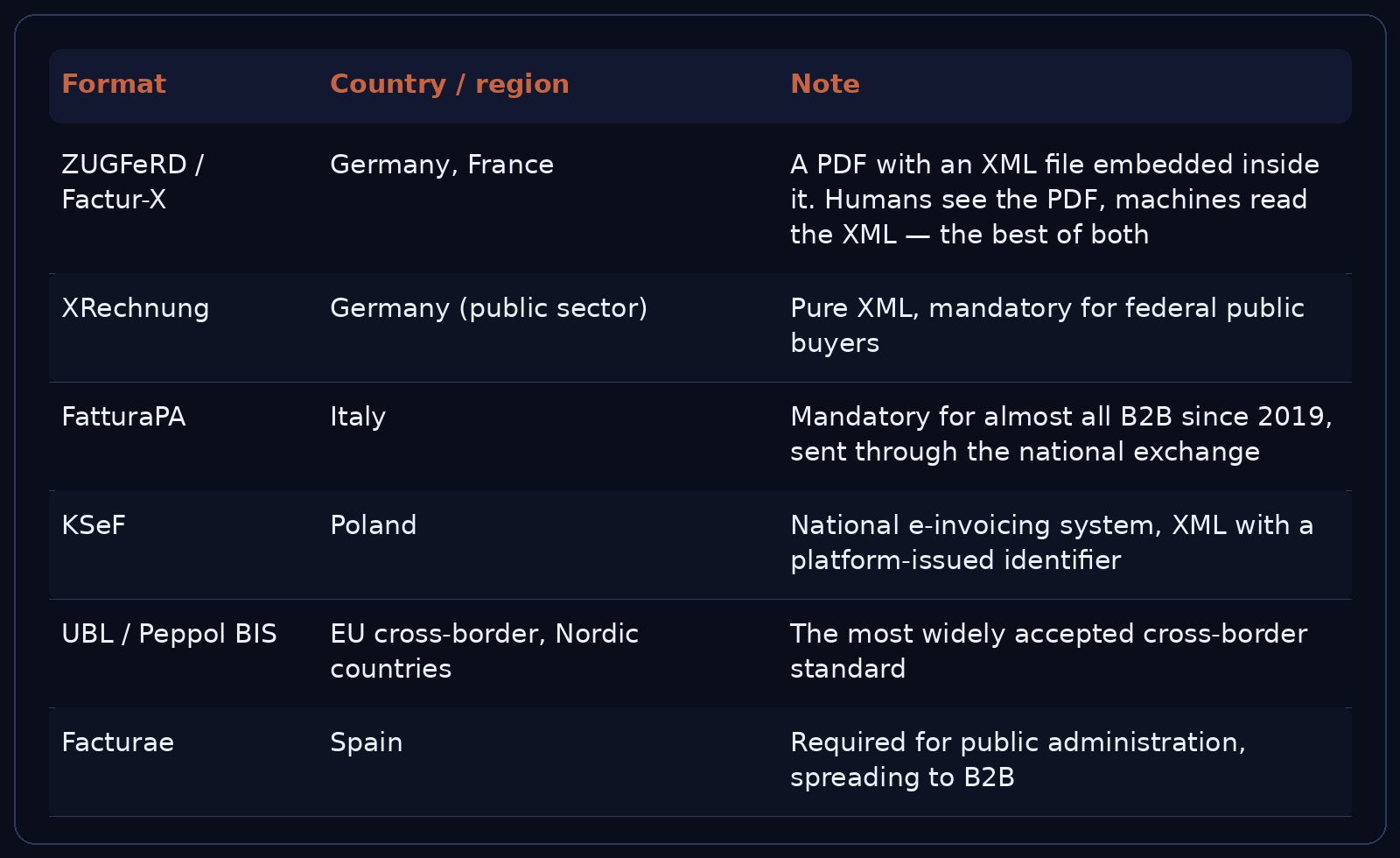
What "a valid e-invoice" means
In a growing list of countries, an invoice is not legally an invoice until it exists in a structured format and passes through a government platform. A PDF sent by email in Italy is not evidence of a deductible cost — the XML in the exchange is.
The practical consequence for anyone invoicing into Europe: ask the client which format they can accept before you send anything. It is one question, and it prevents a month of reissuing.
Photos and scans — the receiving end
Most small businesses don't send structured invoices; they receive them. A supplier sends a photo of a paper invoice, or a PDF that is really a scan. Someone has to type the numbers into accounting software.
That is where errors and hours go. The fix is not to change the sender — it is to read the document once, correctly, and turn it into data:
- XML and structured e-invoices are parsed as code: exact, fast, no interpretation
- Photos and scans need recognition: number, date, supplier, net, tax, gross, and a check that the totals add up
- Duplicates need to be caught before they are booked twice
We do both, and the difference in cost is real: structured files cost nothing to process, images cost per page.
Which format should you send
- To a small business, one-off: PDF. Add the invoice number in the file name
- To a large company: ask. Likely PDF plus a PO number, or XML into their portal
- To German or Italian public bodies: XRechnung or FatturaPA respectively. A PDF will be rejected
- Cross-border B2B in the EU: ZUGFeRD/Factur-X — it satisfies both the human and the machine
The one rule
The format is not a style choice. It decides whether your invoice can be processed without a human retyping it — and every human retyping step is a delay and a possible error.
If you receive invoices in several formats and want them as data, we read all of the above. If you are still chasing payments after the invoice went out, start here.